I’ve seen many developers wrestle with version control. Over many projects and many branching models, here’s one that works.
Normal flow
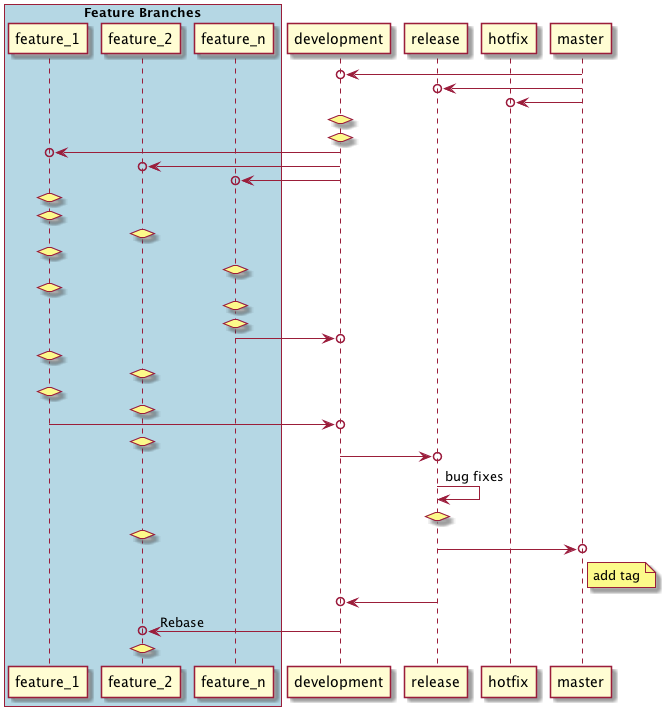
In the above flow:
- Development, release, and hotfix branches fork from master.
- Every feature branch forks from development.
- Feature branches merge back to development.
- Development merges to release.
- Bug fixing during testing happens in the release branch.
- Release merges to master. (Master goes to production.)
- Add a tag for the release on master.
- Release merges back to development.
- Rebase all feature branches that are not in master.
Hotfix flow
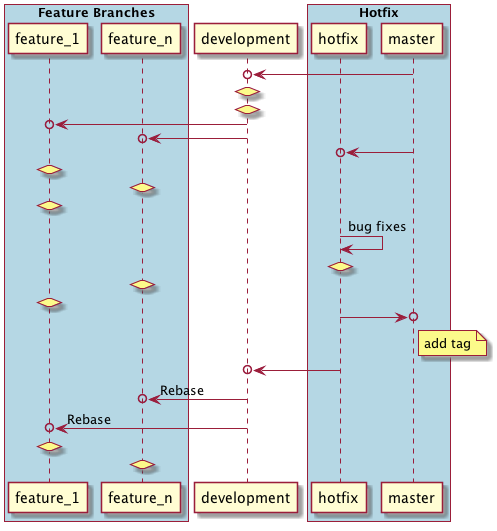
For hotfixes on production:
- Fork a hotfix branch from master.
- Fix the bug in the hotfix branch.
- Merge the hotfix to master.
- Add a tag for the hotfix.
- Merge the hotfix to development.
- Rebase all feature branches that are not in master.
Commands
Fork a new feature branch from development:
git checkout development
git checkout -b feature_branch
# or, in one step:
git checkout -b feature_branch development
Merge a feature branch back to development:
git checkout development
git merge --no-ff feature_branch
--no-ff disables fast-forwarding, creating an explicit merge commit instead of putting all the feature commits directly on development. This preserves the historical existence of the feature branch.
Add a tag:
git tag -a 1.0.0 -m "Version 1.0.0 release"-a adds the tag; -m sets the message (optional). Use -s or -u <key> to sign the tag cryptographically.
Rebase a feature branch:
git checkout feature_branch
git rebase <source_branch_or_tag>
git push origin feature_branch
Delete a local feature branch:
git branch -d feature_branchThis errors if the branch hasn’t been merged anywhere. Use -D instead to force-delete an unmerged branch.
Hope this helps.